How to Launch Your 1xBet Cash Desk: Complete Onboarding Guide
A step-by-step blueprint for independent P2P traders, crypto cashiers, and retail kiosk operators. Clear requirements, rapid verification, and zero hidden platform charges.
18+ VerificationAdult compliance standardCountry-Based FloatMinimum depends on your marketAndroid DeviceDedicated MobCash POS software15–30 Min OnboardingDuring standard operating hours
Eligibility
Baseline Prerequisites to Operate a Desk
01
Legal Age and Identity (18+)
Candidates must be of legal adult age and ready to verify contact details via Telegram or WhatsApp for secure communication.
02
Operational Capital
You need starting capital to fund the desk's working balance. The minimum deposit depends on your country and remains available for processing client operations.
A working smartphone, tablet, or dedicated POS terminal with stable mobile internet. Exact system requirements will be confirmed with the verified APK release.
04
P2P and Payment Literacy
Basic understanding of local bank transfers, P2P platforms, and cryptocurrency handling for fiat liquidity management.
Four-stage workflow
From Application to First Transaction
Each stage has one clear action and one verifiable result.
01
About 2 minutes
Application Submission
Action: Open the onboarding page, choose your preferred language and country, then continue through the assigned regional channel.
Result: Your application is routed to the correct regional team.
Action: A regional coordinator confirms the operating terms, payment rails, and creates your Cashier ID.
Result: Your working account receives approval in the terminal.
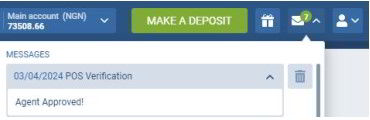
Where approval appears: open Messages, find PS Verification, and confirm the status reads Agent Approved!
03
Country-based amount
Float Deposit and Balance Funding
Action: Deposit the required working capital via an approved cryptocurrency or supported local payment method. Minimum deposit depends on your country.
Result: The operational balance becomes visible in the terminal.
Follow the terminal confirmation flow to prevent errors and protect both the cashier and the player.
Money in
Processing Player Deposits
The player provides their 1xBet account number and the cash or transfer amount.
The cashier enters the player's ID and amount into the MobCash terminal.
After confirmation, funds are credited to the player's account and the deposit commission is recorded.
Money out
Processing Player Withdrawals
The player requests a withdrawal and selects the available cashier desk.
The player receives a security code and provides it to the cashier.
The cashier enters the code, waits for terminal confirmation, then issues cash or a local transfer and records the margin.
Security SOP
Three Non-Negotiable Operating Rules
Rule 01
Never Release Funds Without Terminal Confirmation
Never hand over cash based on player screenshots or text messages. Process payouts only after confirmation inside MobCash.
Rule 02
Protect 2FA and Credentials
Network coordinators and support staff will never ask for your cashier password or one-time authorization codes.
Rule 03
Reconcile the Balance Daily
Compare cash on hand, local accounts, and terminal history at the end of every shift before accepting a new cycle.
Network expansion
Ready to Build a Multi-Terminal Desk?
Agents with sustained volume can request Master Agent terms, onboard secondary cashiers, and receive an override margin under the applicable regional agreement.